# Multiplex Channels
## Multiplex Channels
Multiplex Channel은 Ingest된 여러 개의 Stream을 하나로 결합하여 ABR을 구성하거나 외부 Stream을 복제하여 다른 Application으로 전송할 수 있는 기능입니다.
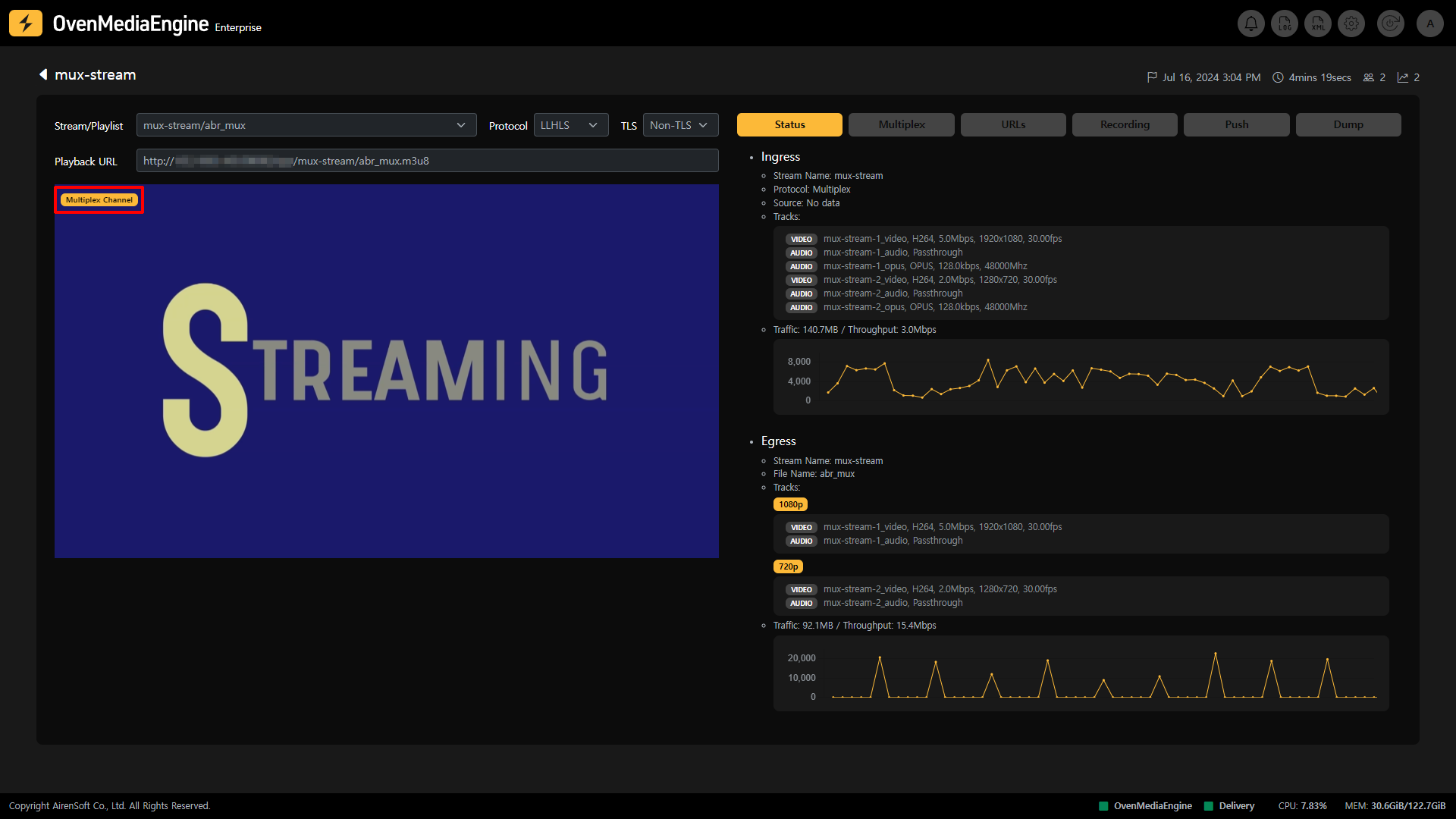
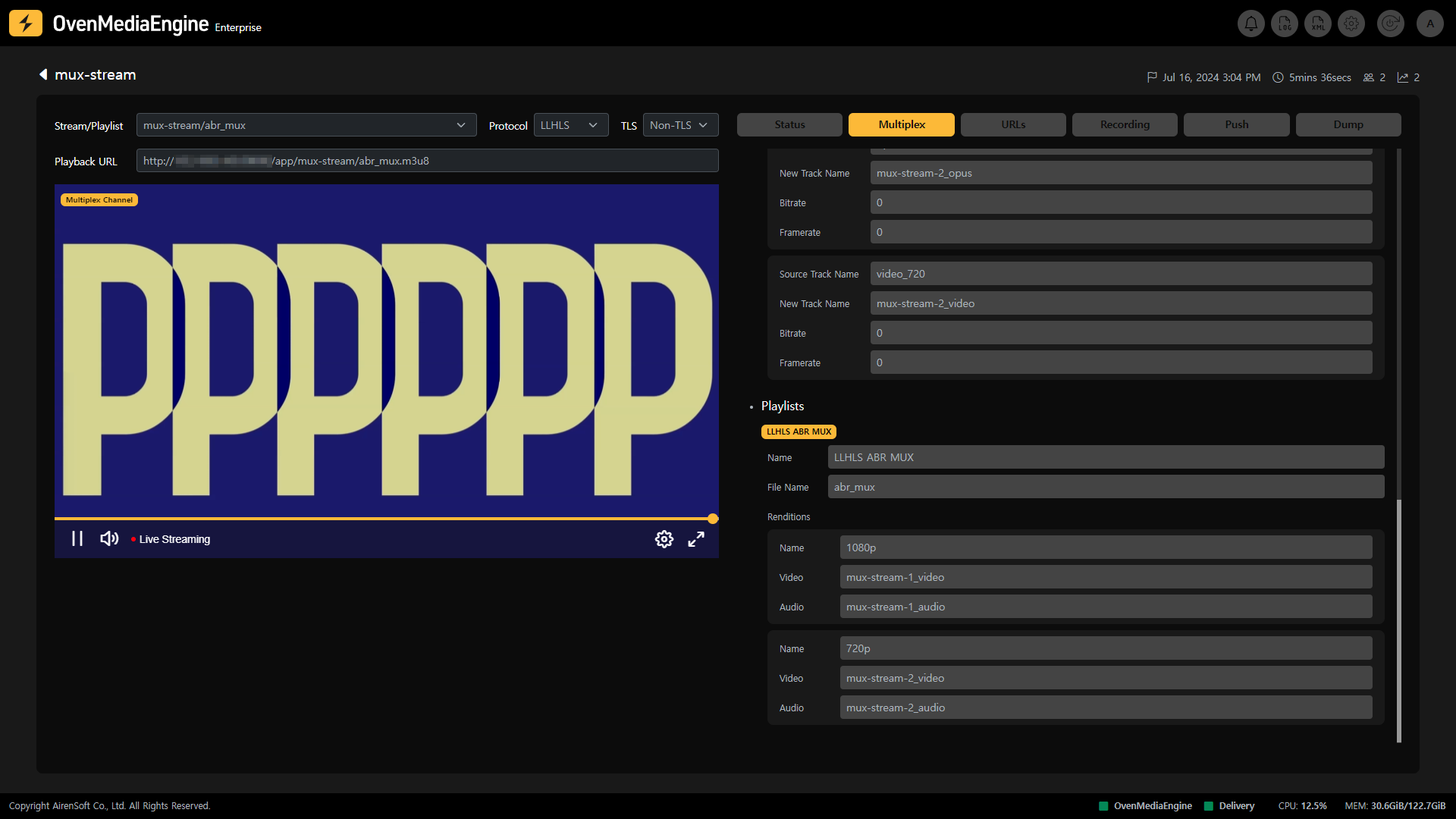
Multiplex Channel은 Stream 목록에서 Stream 항목으로 분류되어 쉽게 구분할 수 있지만, 해당 Stream을 선택하여 Stream Monitoring 화면으로 이동하면 해당 Stream이 재생되고 있는 OvenPlayer 좌측 상단에 Multiplex Channel이 마킹되어 있어 쉽게 확인할 수 있습니다.
## Multiplex Channel 탭 설명
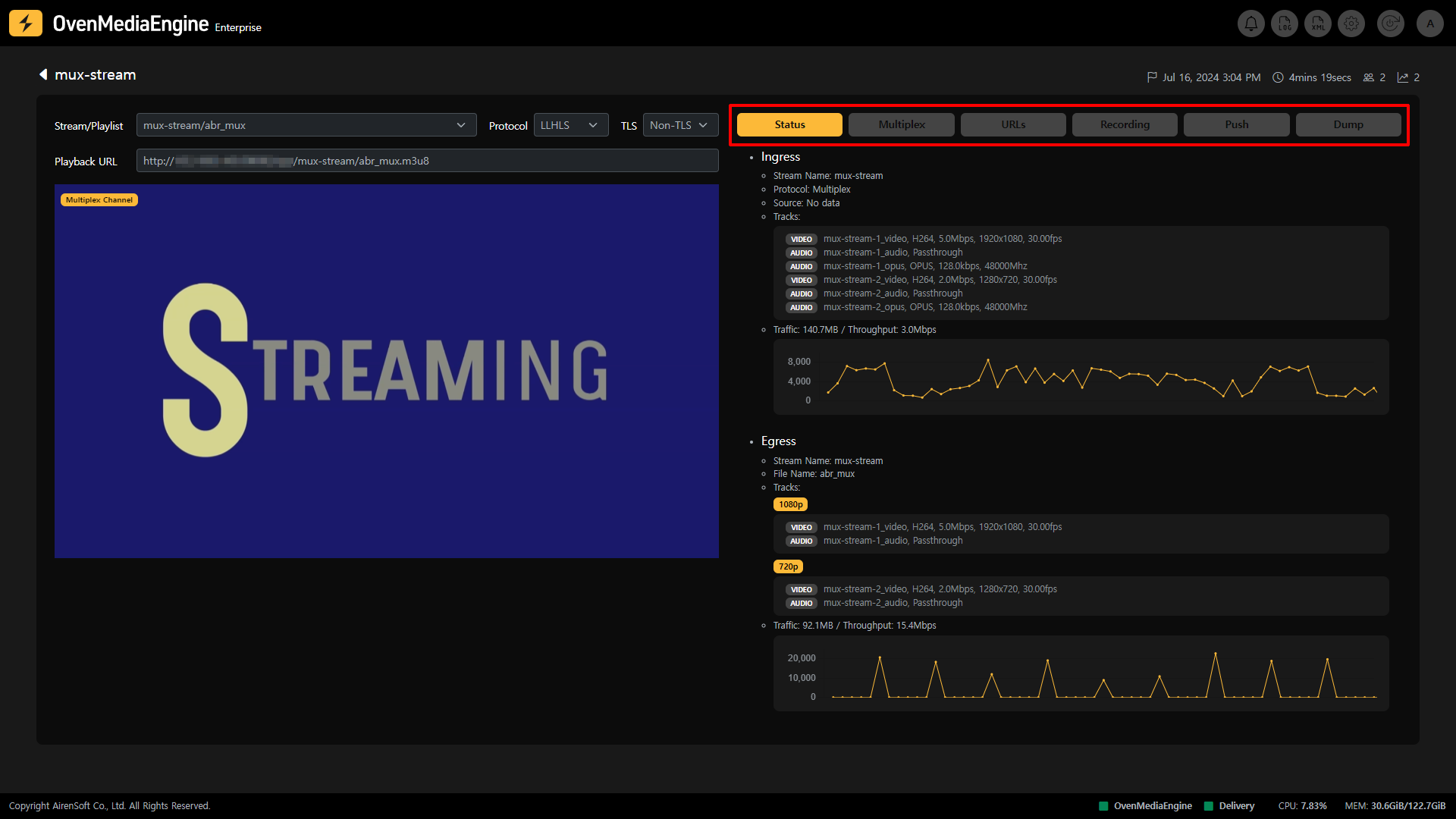
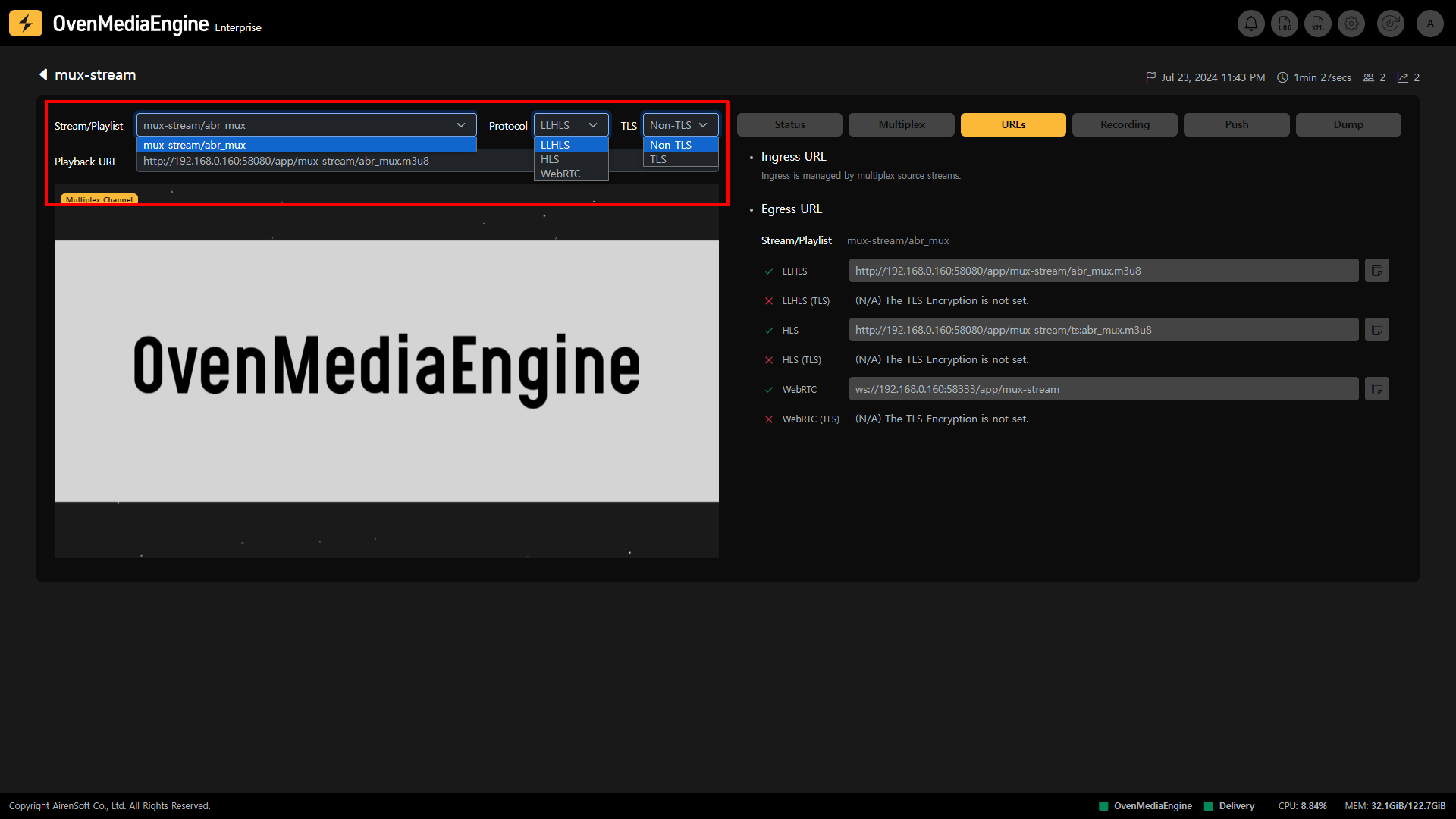
* **Stream Playback**: Stream Monitoring 화면에서 좌측에 위치한 Output Stream, Playlist, Protocol 등의 옵션을 선택 후 내장된 OvenPlayer을 통해 Multiplex Channel의 Stream을 재생할 수 있습니다.
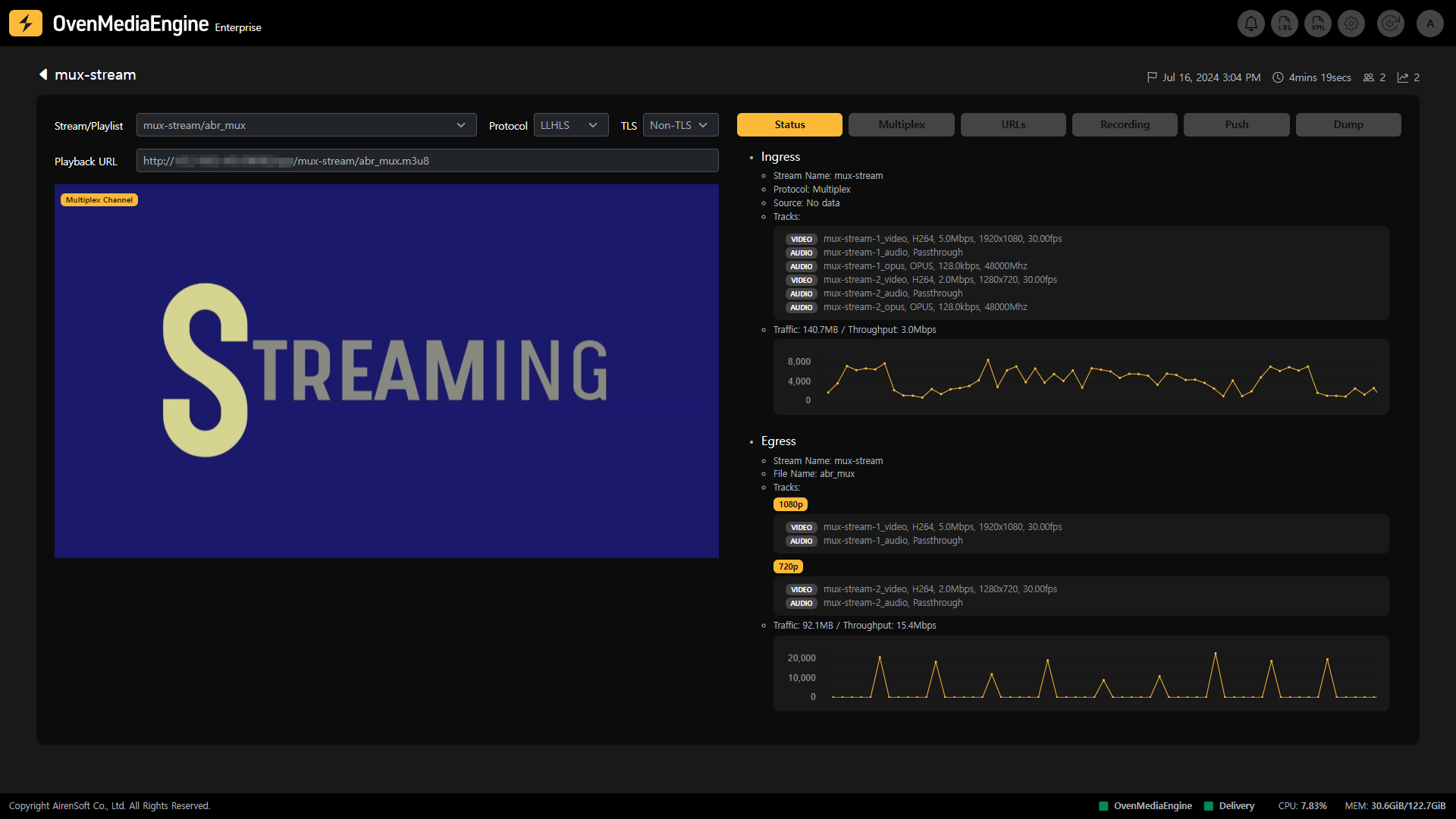
* **Status**: 해당 Channel의 Ingress 및 Egress 메타데이터 및 통계를 확인할 수 있습니다.
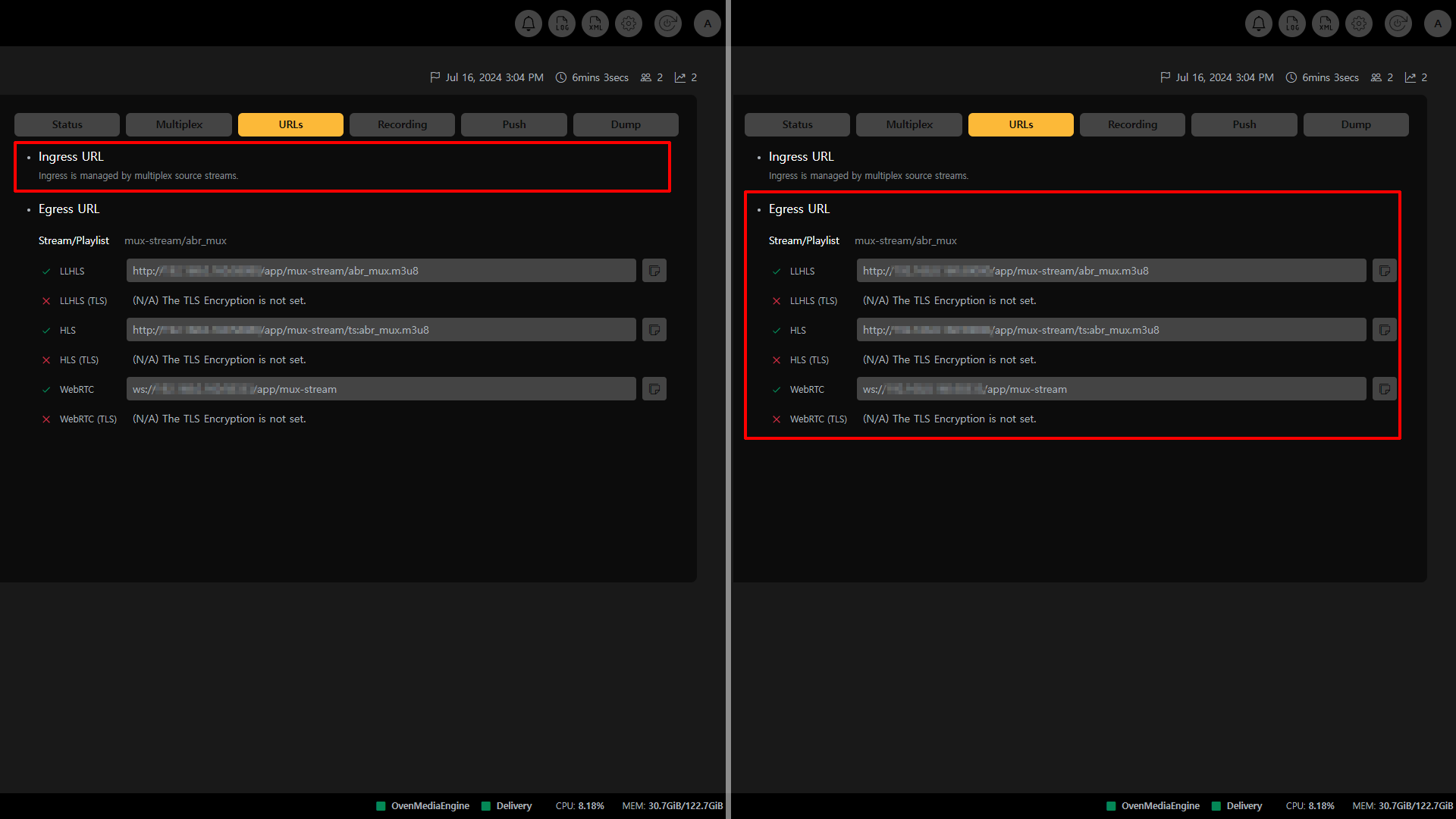
* **URLs**: Multiplex Channel의 Ingress는 OvenMediaEngine에 설정된 Multiplex Provider를 따릅니다. 따라서, URLs 탭에서 사용자는 Egress URL만 확인할 수 있습니다.
{% hint style="info" %}
* 지원하는 Egress Protocol: WebRTC, WebRTC/TLS, LLHLS, LLHLS/TLS, HLS
{% endhint %}
- **Recording**: 해당 Channel의 녹화 상태를 확인할 수 있습니다.
- **Push Publishing**: 해당 Channel을 다른 플랫폼으로 전송하는 Push Publishing 상태를 확인할 수 있습니다.
- **Dump**: 해당 Channel의 LLHLS Dump 상태를 확인할수 있습니다.
## Multiplex Channel Stream 상태 모니터링
### 메타데이터 및 통계 확인
* **Ingress**: Ingress Stream의 Protocol, Soruce 위치, Track, Input Traffic 등을 확인할 수 있습니다.
* *Multiplex Channel의 경우 다양한 Ingress Stream이 들어오므로 Stream 별 Track이 모두 표시됩니다.*
* **Egress**: Egress Stream의 Output Profile, Track, Output Traffic 등을 확인할 수 있습니다.
* *Multiplex Channel의 경우 다양한 Ingress Stream을 하나로 결합하여 ABR을 구성할 수 있으므로 Track이 ABR처럼 표기됩니다.*
## Multiplex
### Mux File
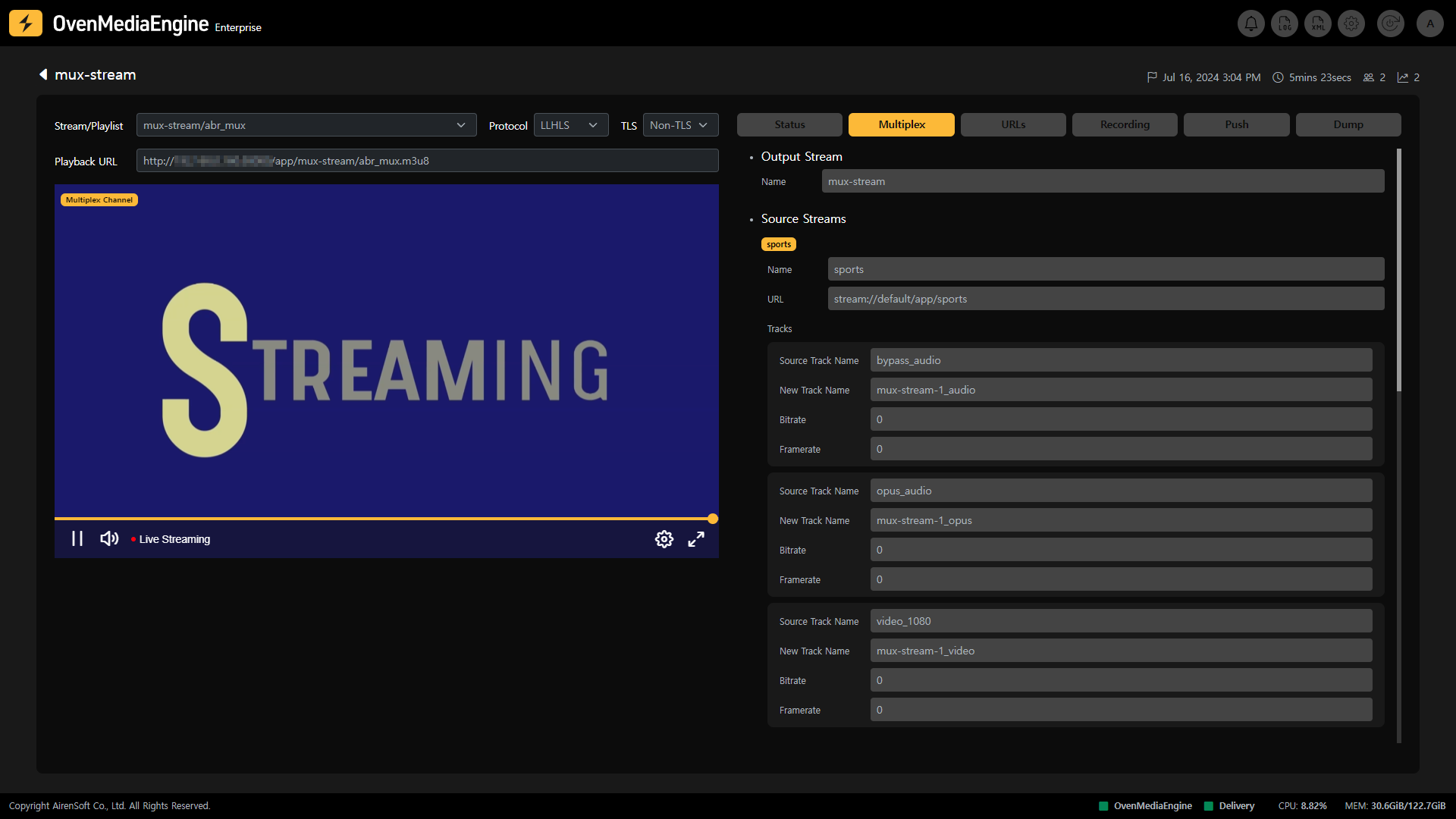
Multiplex Channel을 사용하기 위해 사용자는 `Server.xml`에서 Multiplex Provider를 활성화해야 하며, Mux 파일 (`.mux`) 또는 API를 통해 Multiplex Channel을 생성하고 삭제 할 수 있습니다.
Multiplex Provider는 `MuxFilesDir` 경로를 모니터링하고, Mux 파일이 생성되면 구문을 분석하여 Multiplex Channel을 생성합니다. Mux 파일이 수정되면 기존 채널은 삭제되며 이후 새로운 채널이 다시 생성됩니다. 물론, Mux 파일이 삭제되면 해당 채널은 삭제됩니다.
### Output Stream
Multiplex Channel의 Stream 명이며, Mux 파일명과 동일해야 동작합니다.
{% hint style="success" %}
Output Stream이 `mux-stream`이라면, Mux 파일명 또한 `mux-stream.mux`여야 합니다.
{% endhint %}
### Source Streams
Source Streams는해당 Multiplex Channel로 로드될 Stream 목록이며, Mux 파일을 참조하여 표기합니다. 현재 위치의 `VirtualHost` 또는 `Application` 뿐만아니라 다른 위치의 `VirtualHost` 또는 `Application`의 Stream을 불러올 수 있으며, 지정된 Source Stream의 Stream 명과 Source 위치가 일치하면 자동으로 결합하여 Multiplex Channel Stream을 시작합니다.
{% hint style="warning" %}
여러 개의 Stream이 하나의 Stream으로 결합되는 Multiplex Channel 특성상 Track 명이 중복될 수 있으므로, 로드되는 Stream들의 Track 명이 중복되었다면 변경이 필요합니다.
{% endhint %}
### Playlists
Playlist는여러 개의 Stream을 묶어 ABR처럼 사용 할 수 있게 만들어주는 기능이며, Multiplex Channel에 로드된 여러 개의 Stream의 Track 명을 기준으로 Playlist를 구성해야 합니다.
{% hint style="warning" %}
해당 Playlsit의 File Name은 전체 `Application`에서 고유해야합니다.
{% endhint %}
{% hint style="info" %}
세부 가이드:
{% endhint %}
## Stream 재생
Output Stream 또는 Playlist (OvenMediaEngine 설정에 따름), Protocol 선택 (LLHLS 또는 WebRTC), 인증서 여부 (TLS 또는 Non-TLS) 등 선택한 Playback 옵션에 따라 Stream의 Playback URL이 표시됩니다. 해당 Playback URL을 이용하여 OvenPlayer 또는 외부 플레이어를 통해 재생할 수 있습니다.
### 재생 URL 확인
* **Ingress URL**: 사용자가 설정한 Mux 파일에 따라 OvenMediaEngine이 Ingress하므로, 따로 표시되는 URL이 없습니다.
* **Egress URL**: Multiplex Channel에 설정된 Playlist 별 재생 주소를 확인할 수 있습니다.
{% hint style="info" %}
각 URL 끝 부분에 위치한 Copy 아이콘을 눌러 쉽게 URL을 복사할 수 있습니다.
{% endhint %}
## Recording 상태 확인하기
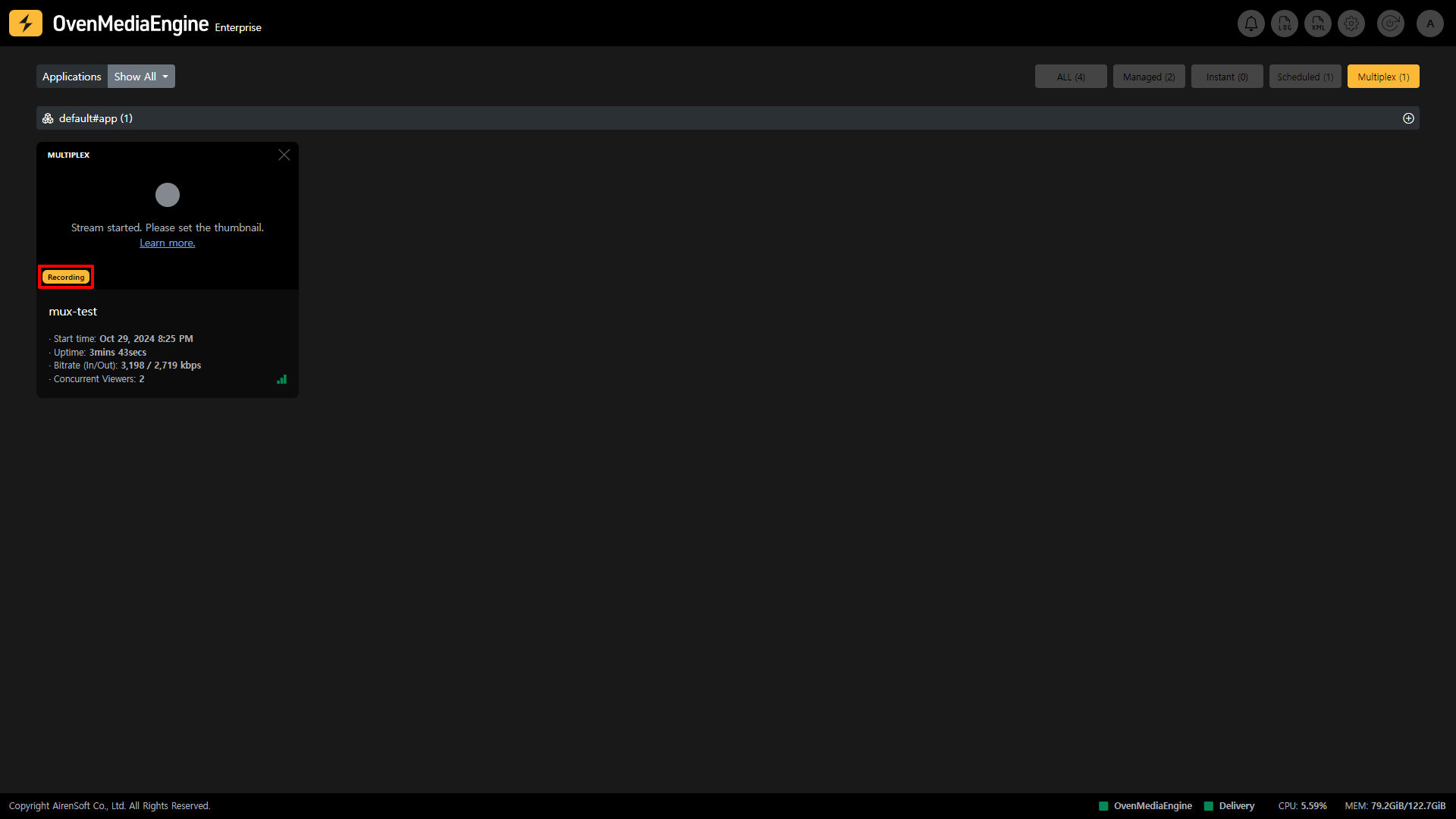
Stream 목록에서 Recording 시 표시되는 마킹
Recording은 해당 Channel이 Live 중일 때 녹화하는 기능으로 해당 Channel이 녹화 중일 때 Stream 목록에서 Recording 마킹이 붙어 한 눈에 녹화 중임을 알 수 있으며, Stream Monitoring 내 Recording 탭을 통해 상세한 녹화 상태를 확인할 수 있습니다.
또한, 사용자는 Record API를 이용해 Recording 기능을 사용하고 제어할 수 있습니다.
{% hint style="info" %}
* Recording 설정 가이드:
* Recording API 가이드:
{% endhint %}
### Recording 시작하기 | 0.17.1.2+
Recording 기능은 Managed Stream, Instant Stream, Scheduled Channel, Multiplex Channel에 구분 없이 동일하게 동작하므로 [#recording-or-0.17.1.2](https://ovenmediaengine-enterprise.gitbook.io/guide/ko-kr/web-console/web-console-overview/managed-and-instant-streams#recording-or-0.17.1.2 "mention")를 참조하십시오.
## Push Publishing 상태 확인하기
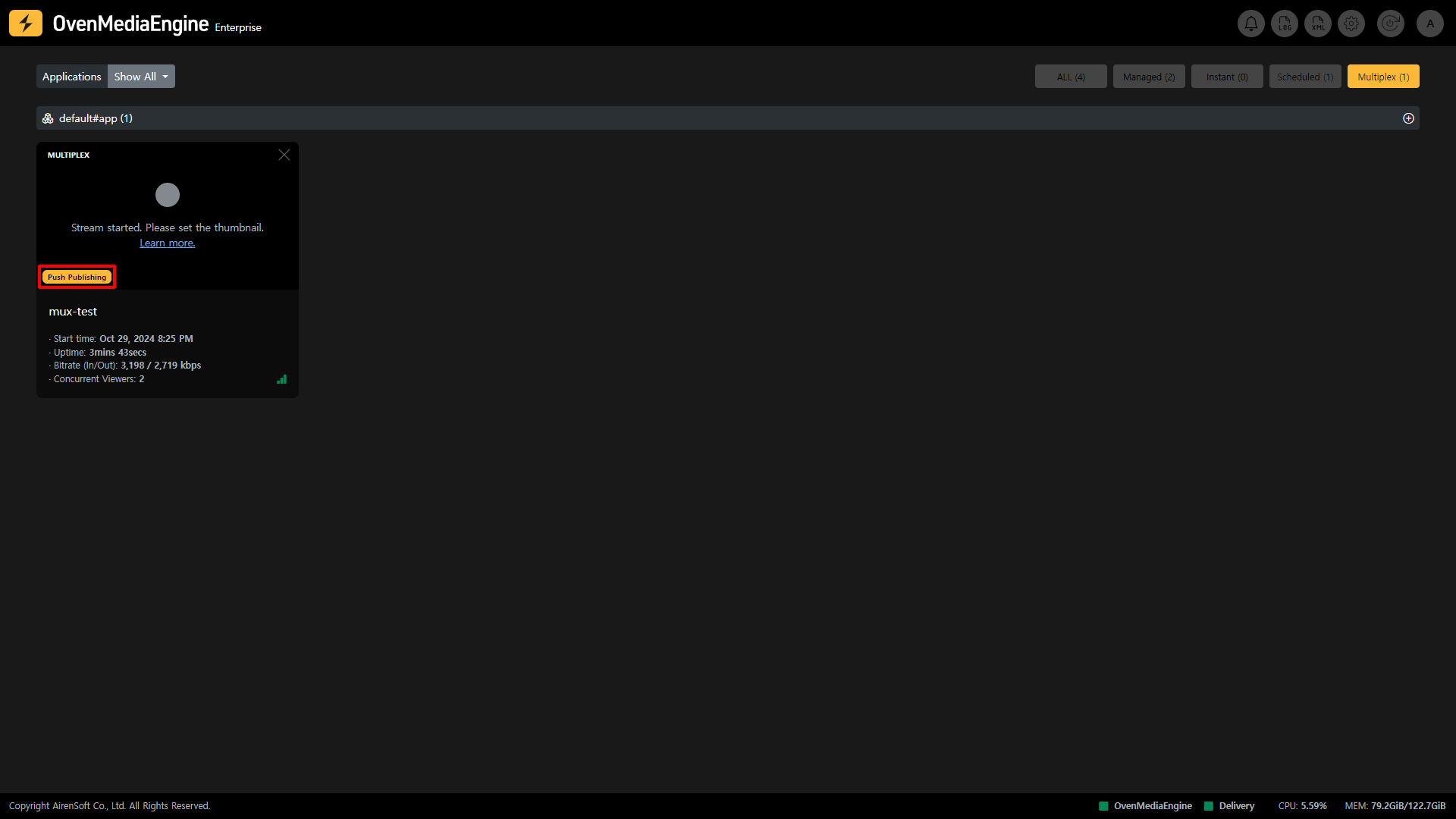
Stream 목록에서 Push 시 표시되는 마킹 및 결과물
Push Publishing은 해당 Channel을 다른 플랫폼으로 재송출하는 기능으로 해당 Channel이 재스트리밍 되는 동안 Stream 목록에서 Push Publishing 마킹이 붙어 한 눈에 재송출 중임을 알 수 있으며, Stream Monitoring 내 Push Publishing 탭을 통해 상세한 Push Publishing 상태를 확인할 수 있습니다.
또한, 사용자는 Push Publishing API를 이용해 Push Publishing 기능을 사용하고 제어할 수 있습니다.
{% hint style="info" %}
* Push Publishing 설정 가이드:
* Push Publishing API 가이드:
{% endhint %}
### Push Publishing 시작하기 | 0.17.1.2+
Push Publishing 기능은 Managed Stream, Instant Stream, Scheduled Channel, Multiplex Channel에 구분 없이 동일하게 동작하므로 [#push-publishing-or-0.17.1.2](https://ovenmediaengine-enterprise.gitbook.io/guide/ko-kr/web-console/web-console-overview/managed-and-instant-streams#push-publishing-or-0.17.1.2 "mention")를 참조하십시오.
## LLHLS Dump 상태 확인하기
(LL)-HLS Dump는 해당 Channel이 LLHLS로 재생될 때 `.m3u8`과 모든 트랙 세그먼트를 Dump하여 Live 중일 때에도 Dump된 지점까지 파일을 VoD에 즉시 제공할 수 있는 기능으로 해당 Stream이 Dump 되는 동안 Stream Monitoring 내 Dump 탭을 통해 상세한 (LL)-HLS Dump 상태를 확인할 수 있습니다.
또한, 사용자는 Dump API를 이용해 Dump 기능을 사용하고 제어할 수 있습니다.
{% hint style="info" %}
* LLHLS Dump 설정 가이드:
* LLHLS Dump API 가이드:
{% endhint %}
### (LL)-HLS Dump 시작하기 | 0.17.1.2+
(LL)-HLS Dump 기능은 Managed Stream, Instant Stream, Scheduled Channel, Multiplex Channel에 구분 없이 동일하게 동작하므로 [#ll-hls-dump-or-0.17.1.2](https://ovenmediaengine-enterprise.gitbook.io/guide/ko-kr/web-console/web-console-overview/managed-and-instant-streams#ll-hls-dump-or-0.17.1.2 "mention")를 참조하십시오.